
How the PRPL Pattern Saved the Day in a Fintech Dashboard
2025-01-05
While working at a Finqle, I faced a challenge that’s common in high-trust platforms: delivering fast, seamless access to key areas of the product—specifically the home page and the dashboard. These were the first touchpoints users interacted with after login, and any delay could undermine confidence in the platform.
To meet performance expectations without compromising complexity, I applied the PRPL pattern—a web performance strategy that made a measurable difference.
What Is the PRPL Pattern?
PRPL is a frontend optimization strategy developed by Google to improve the speed and responsiveness of Progressive Web Apps (PWAs). It stands for:
| Step | Action | Purpose |
|---|---|---|
| P | Push critical resources | Load essential assets early via HTTP/2 or <link rel="preload"> |
| R | Render initial route | Display the first meaningful view as quickly as possible |
| P | Preload remaining routes | Begin loading other views in the background |
| L | Lazy-load other resources | Load non-essential assets only when needed |
The Challenge
The login flow was a critical part of the user journey. After authentication, users were directed to a dashboard filled with charts, data tables, and analytics widgets. Loading all of that upfront slowed down the experience and created friction.
To improve perceived performance, I restructured the flow using PRPL—and added a strategic enhancement that aligned with the product’s trust-first philosophy.
Two-Step Login + PRPL = Real Results
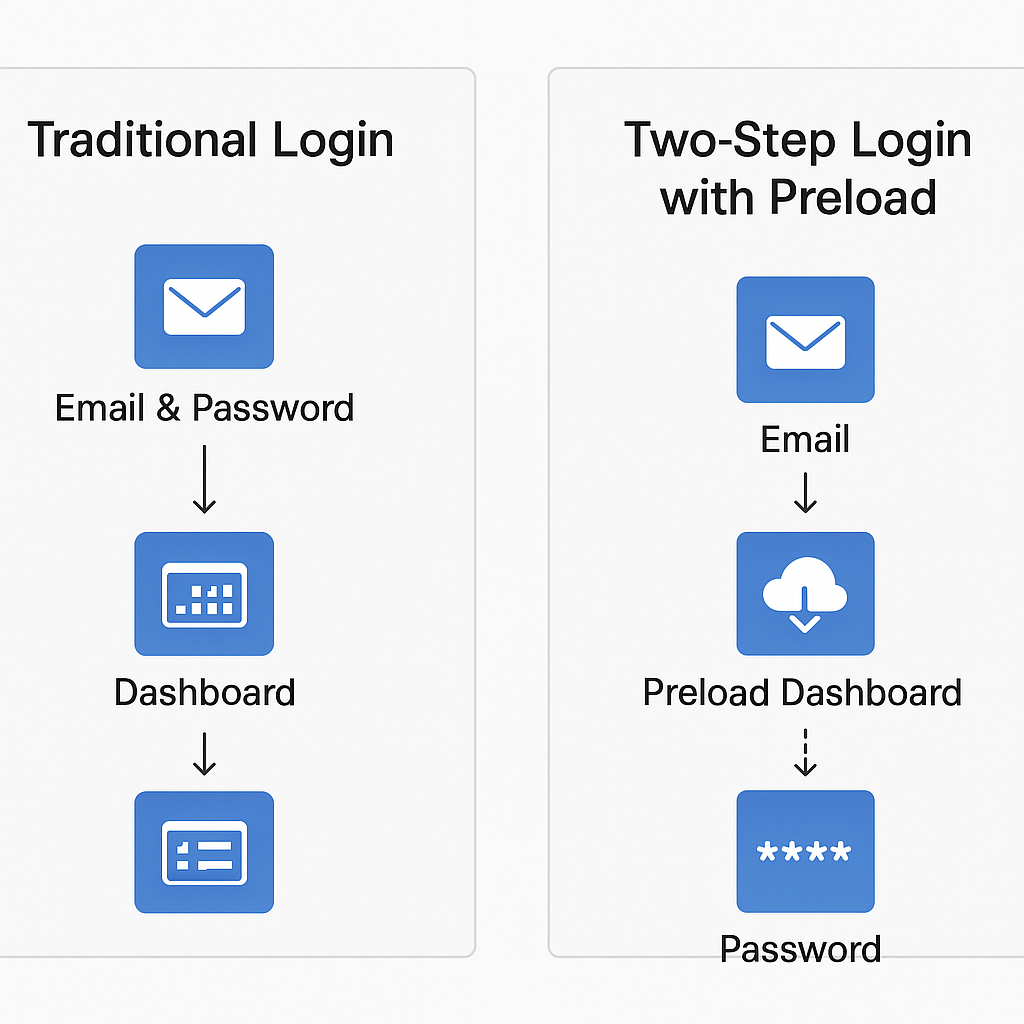
I implemented a two-step login flow:
- Step 1: The user enters their email.
- Step 2: Once the backend confirms the email exists, the dashboard route and assets are preloaded in the background—even before the password is entered.
This approach allowed the product to leverage the “Preload Remaining Routes” step of PRPL in a context-aware way. By the time the user completed authentication, the dashboard was already primed and ready.
The impact was clear:
34% of users reported noticeable improvements in the login-to-dashboard experience. The product felt faster, more responsive, and more trustworthy—even though backend processing times hadn’t changed.
PRPL in Action
Here’s how the pattern was applied:
1. Push Critical Resources
Used <link rel="preload"> to deliver CSS, fonts, and JS for both login and dashboard as early as possible.
2. Render Initial Route
Kept the login page minimal and server-rendered for instant load. Dashboard scripts were excluded at this stage.
3. Preload Remaining Routes
After email confirmation, triggered <link rel="prefetch"> to begin loading dashboard components in the background.
4. Lazy-load Non-Essential Resources
Deferred charts, analytics, and third-party widgets until user interaction—keeping the initial dashboard load fast and clean.
The Hurdles I Encountered
Overfetching Unused Resources
One of the first issues I ran into was overfetching. Preloading and prefetching resources felt like a smart move—until I noticed that some assets were being downloaded even when users never accessed the corresponding routes. It was a waste of bandwidth and, in some cases, slowed down more important requests.
Complex Build Configuration
PRPL forced me to rethink how I structured the frontend build. I had to split code into meaningful chunks, configure preload and prefetch hints, and avoid duplication across routes. Tools like Webpack and Vite helped, but the setup became more complex than I initially expected. It required careful planning and constant iteration.
Cache Management
Another challenge was browser cache limitations. On mobile devices especially, aggressive preloading pushed out other useful resources. I had to be selective about what I preloaded and when, otherwise I risked evicting assets that were actually needed later.
Unpredictable User Behavior
PRPL assumes a fairly linear user journey, but real users don’t always follow the expected path. Some jumped between routes in ways I hadn’t anticipated, which made my preload strategy less effective. I had to rely on analytics to better understand navigation patterns and adjust accordingly.
SEO and SSR Considerations
Since the product used server-side rendering, I had to be cautious with how preload strategies interacted with hydration and crawlability. Some preload tags caused layout shifts or interfered with the initial render, which impacted both SEO and user experience. Balancing SSR with PRPL required extra care.
Device and Network Constraints
This was perhaps the most humbling part. On low-end devices or slow networks, preloading too much actually hurt performance. I had assumed PRPL would solve these issues, but misconfigured preload behavior made things worse. I had to test on real devices, simulate poor connections, and scale back my assumptions.
What Helped Me Move Forward
To overcome these challenges, I started using conditional preloading—triggering asset loads only after key user signals, like confirming an email in a two-step login flow. This made the experience feel faster without overwhelming the browser or network.
I also learned to balance preloading with lazy-loading. Not everything needs to be ready upfront. By deferring non-essential resources until the user actually interacted with them, I kept the initial load light and responsive. It wasn’t just about speed—it was about making smart decisions based on real user behavior.
What I Learned
PRPL isn’t just a performance pattern—it’s a user experience strategy. In fintech, where milliseconds matter and trust is everything, it helped deliver a login flow that felt fast, secure, and professional.
For any product where speed and credibility go hand in hand, PRPL is a powerful tool worth considering.