
How the PRPL pattern saved the day in a fintech dashboard
A two-step login and the PRPL pattern made a data-heavy fintech dashboard feel fast, without changing the backend.
At Finqle, I faced a challenge that’s common in high-trust products: giving people fast access to the first screens they saw after logging in, the home page and the dashboard. Any delay there could undermine their confidence in the platform.
To meet that expectation without stripping out features, I applied the PRPL pattern, a web performance strategy that made a measurable difference.
What the PRPL pattern is
PRPL is a loading strategy that Google described for progressive web apps. It stands for:
- Push (or preload) the critical resources: load what the first view needs as early as possible.
- Render the initial route: show the first meaningful view as fast as you can.
- Pre-cache the remaining routes: start loading the other views in the background.
- Lazy-load everything else: fetch non-essential resources only when they’re needed.
The “push” originally meant HTTP/2 server push. Browsers have since dropped it (Chrome removed it in 2022), so today the same job is done with <link rel="preload">, or with 103 Early Hints from the server.
The challenge
The login flow was a critical part of the journey. After signing in, people landed on a dashboard full of charts, data tables and analytics widgets. Loading all of that up front slowed the experience down and added friction at the worst moment.
To improve how fast it felt, I restructured the flow around PRPL, with one addition that suited the product’s trust-first approach.
A two-step login, plus PRPL
I built a two-step login:
- The user enters their email address.
- Once the backend confirms the account exists, the dashboard’s route and assets start loading in the background, while the user is still typing their password.
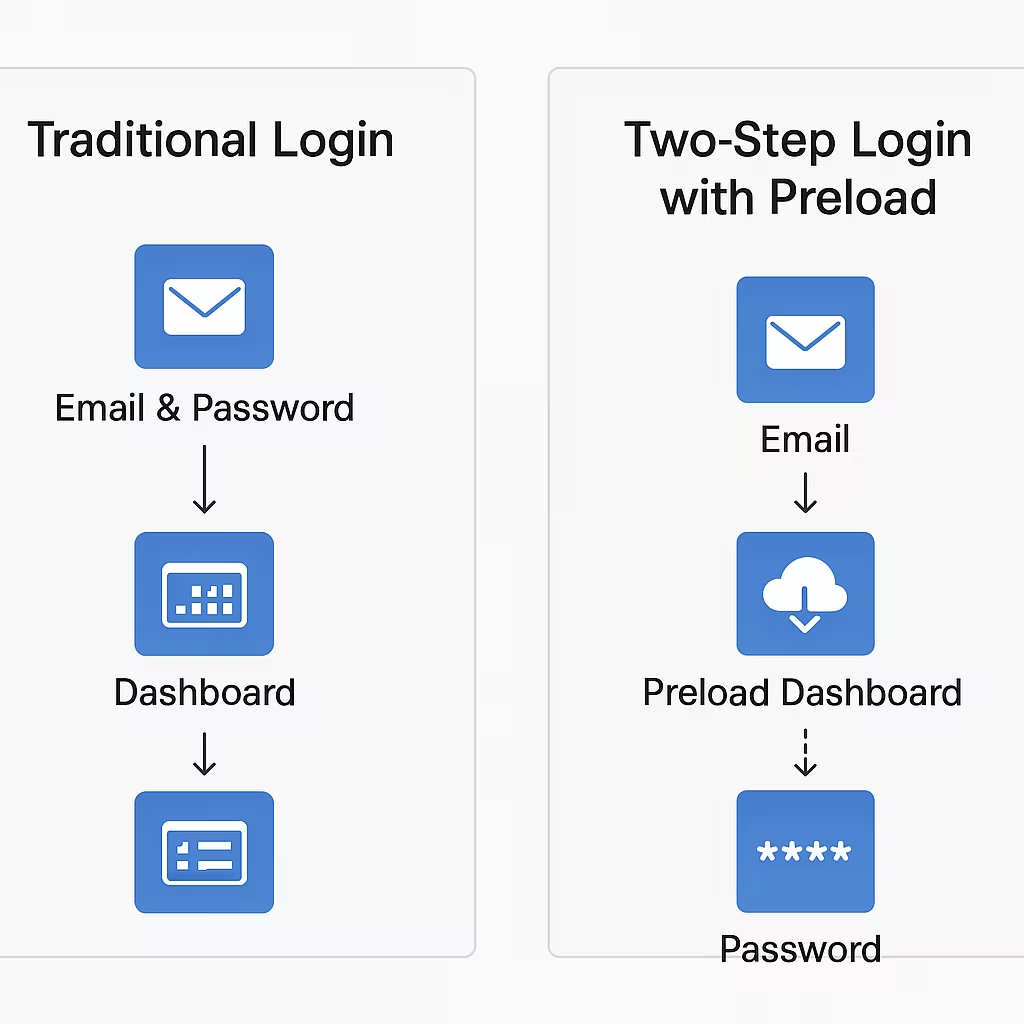
That put PRPL’s third step, loading the remaining routes, to work at the moment it was most likely to pay off. By the time someone finished signing in, the dashboard was already primed.
The impact was clear: 34% of users reported a noticeable improvement in getting from login to dashboard. The product felt faster, more responsive and more trustworthy, even though the backend’s processing times hadn’t changed.
PRPL in action
1. Push critical resources
<link rel="preload"> delivered the CSS, fonts and JavaScript that the login page and the dashboard share, as early as possible.
2. Render the initial route
The login page stayed minimal and server-rendered, so it loaded at once. No dashboard scripts at this stage.
3. Preload the remaining routes
Once the email was confirmed, <link rel="prefetch"> started loading the dashboard’s components in the background. A few lines are enough:
// once the backend has confirmed the email
for (const href of dashboardAssets) {
  const link = document.createElement('link');
  link.rel = 'prefetch';
  link.href = href;
  document.head.append(link);
}
4. Lazy-load the rest
Charts, analytics and third-party widgets waited until people interacted with them, which kept the dashboard’s first load fast and clean.
The hurdles
Over-fetching
One of the first problems was over-fetching. Preloading and prefetching felt like a smart move, until I noticed assets being downloaded for routes people never visited. That wasted bandwidth, and sometimes slowed down more important requests.
A more complex build
PRPL made me rethink the front-end build: splitting the code into meaningful chunks, configuring preload and prefetch hints, and avoiding duplication across routes. Webpack and Vite helped, but the set-up became more complex than I expected, and it took careful planning and constant iteration.
Cache management
Browser caches are limited, on phones especially. Aggressive preloading pushed out other useful resources, so I had to be selective about what to preload and when, or risk evicting assets that were needed later.
Unpredictable users
PRPL assumes a fairly linear journey, and real people don’t always follow one. Some jumped between routes in ways I hadn’t anticipated, which made the preload strategy less effective. Analytics showed me the real navigation patterns, and I adjusted to them.
Server rendering and SEO
Because the product was server-rendered, I had to be careful with how preloading interacted with hydration and crawling. Some preload hints competed with the initial render and caused layout shifts, which hurt both search and the experience. Balancing server rendering with PRPL took extra care.
Devices and networks
This was the most humbling part. On low-end devices and slow networks, preloading too much made performance worse. I had assumed PRPL would solve those cases; misconfigured, it did the opposite. I had to test on real devices, simulate poor connections and scale back my assumptions.
What helped
Two things got me past these problems. The first was conditional preloading: loading assets only after a clear signal of intent, like a confirmed email in the two-step login. The experience felt faster without overwhelming the browser or the network.
The second was balancing preloading with lazy-loading. Not everything has to be ready up front. Deferring what people hadn’t asked for yet kept the first load light and responsive. It wasn’t only about speed; it was about deciding from real behaviour.
What I learned
PRPL isn’t just a performance pattern; it’s a user experience strategy. In fintech, where milliseconds matter and trust is everything, it gave us a login flow that felt fast, secure and professional. For any product where speed and credibility go hand in hand, it’s worth considering.